Elevate Your Fantasy Book Marketing with Canva Mockups
For fantasy authors, the journey from manuscript to published book is a monumental achievement. Yet, the work doesn't end there. The next crucial phase is marketing, and in the visually driven world of social media, your book cover needs to do more than just look good on a retailer's page—it needs to stop a scrolling thumb. This is where a dedicated set of Canva Fantasy Book Cover Mockups becomes an indispensable part of your marketing toolkit. Designed specifically for the needs of fantasy authors, these mockups bridge the gap between your finished cover and a compelling social media presence.
What Exactly Are These Fantasy Book Cover Mockups?
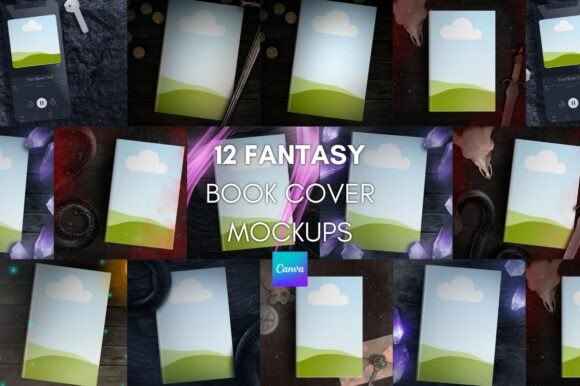
Think of a mockup as a digital stage for your book. Instead of just posting a flat image of your cover, a mockup presents it in a real-world context. This bundle provides twelve distinct scenes, each rendered in-house to ensure a unique, premium feel that generic stock mockups lack. You won't find these exact scenes elsewhere. The visual personality of each mockup leans into the genre—think moody lighting, textured backgrounds, and settings that evoke mystery, adventure, or ancient worlds. The style is contemporary yet timeless, designed to make your cover art the undeniable hero of the image.
The appeal lies in its practicality. As a design asset, it's built for speed and ease of use. You receive a simple ZIP folder with a PDF link and a JPG of tips. Click the link in the PDF, and the entire template pack is added directly to your Canva account. There's no need for a Canva premium subscription, making it accessible for authors at any stage of their career. The process is straightforward: open the template, find the frame for your cover, upload your artwork, and drag it into place. A pro-tip for when the frame seems unresponsive is to temporarily move it above the mockup layer, place your cover, and then move it back down—a simple trick that solves a common Canva layering issue.
Strategic Applications for Authors and Marketers
The true value of these fantasy book cover mockups is realized in their application. They are not just pretty pictures; they are strategic design assets that solve specific marketing problems.
- Social Media Consistency: Using a cohesive set of mockups across your Instagram, Facebook, and Pinterest posts creates a unified visual brand identity. Followers will instantly recognize your aesthetic, building familiarity and professionalism. This consistency is key to growing an engaged audience.
- Launch Campaigns: During a book launch, you need a high volume of content. These twelve mockups provide a library of images for countdown posts, teaser reveals, and "available now" announcements. This prevents your feed from looking repetitive while maintaining a polished look.
- Advertising and Promotions: When running Facebook or Amazon ads, a 3D-style mockup often outperforms a flat cover. It adds depth and perceived value, making the book feel like a tangible product. The variety here allows for A/B testing different images to see what resonates most with your target audience.
- Reader Engagement: Create graphics for newsletter sign-up incentives, giveaway announcements, or reader appreciation posts. A well-placed mockup makes these communications feel more special and visually appealing.
While crafted for fantasy, the utility extends. A publisher could use them for a sci-fi or historical fiction title. A content creator in the book review space might use them to feature books they're discussing. The personality of the renders is flexible enough to support various related genres, all while maintaining a high-end, professional style.
Practical Tips for a Flawless Final Image
Getting the most from your mockups involves a few practical steps. First, consider your cover's own visual hierarchy. A mockup with a busy background might compete with a detailed, intricate cover. In that case, choose a cleaner mockup scene. Conversely, a minimalist cover can be elevated by a more textured, atmospheric background.
Pay attention to lighting and color. As noted in the included tips, if your cover appears too dark within the mockup scene, use Canva's built-in editing tools—the "Brightness," "Contrast," and "Saturation" sliders—to harmonize it. The goal is for your cover to look integrated, not pasted on. This is where an experienced designer's eye comes in handy, and these mockups are built to facilitate that adjustment.
Think about typography and readability. If your title text is small or uses a delicate script font, ensure it remains legible against the mockup's background at a small size, as it will appear on a phone screen. You may need to slightly increase contrast or choose a mockup with a simpler backdrop to support your typeface.
Finally, treat these mockups as a starting point. Combine them with other design assets in Canva—like complementary color swatches, borders, or simple text overlays—to create unique graphics. This approach ensures your social media graphics feel custom and dynamic, directly supporting your brand identity as an author.
In the crowded space of book marketing, professional presentation is no longer optional. It's a direct reflection of the care you've put into your story. A tool like this Canva Fantasy Book Cover Mockups bundle provides a practical, affordable, and highly effective solution to elevate your book's visual marketing, allowing you to focus more on writing and connecting with readers, and less on wrestling with complex design software.