Create Groovy Wavy Text in Canva with Typecraft
That classic, undulating text style from the 70s is back in a big way. You see it on concert posters, trendy brand logos, and scroll-stopping social media posts. The challenge has always been creating that perfect, fluid warp without spending hours in complex software. Canva’s new Typecraft app changes the game, making it surprisingly simple to craft CANVA Editable Retro Groovy Wavy Text right inside your favorite design tool.
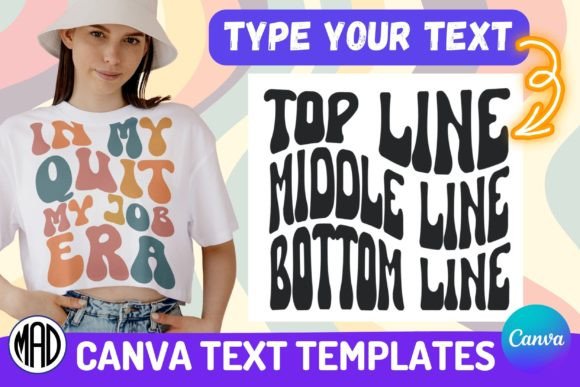
This isn’t just about slapping a wavy font on a page. It’s about creating a custom, editable text element that flows with intention. The visual personality here is unmistakable: think bold, rounded letterforms that seem to melt and curve like a lava lamp. It evokes a sense of fun, nostalgia, and carefree creativity. This style doesn’t just sit on the design; it becomes the design, acting as a major graphical element that commands attention.
Where Does This Groovy Style Truly Shine?
The applications for a creative font like this are broader than you might initially think. Its strength lies in projects where you need to inject personality and break from corporate sterility. In brand identity, it’s perfect for a boutique coffee shop, a record store, or a children’s clothing line—any brand that wants to feel approachable and vibrant. For logo design, a warped text treatment can become a memorable mark, though it’s best for the logotype itself rather than the supporting text.
Across marketing and digital spaces, it’s a powerhouse for engagement. Use it for Instagram story headers, YouTube thumbnails, or Facebook event banners where you need to stop the scroll. In editorial design, it makes fantastic pull quotes or chapter headings in a magazine or blog post. For packaging design, imagine it on a craft beer label or a snack bag—immediately communicating a fun, artisanal quality. Even for personal crafting projects like custom t-shirts or party invitations, this style adds instant, professional-looking flair.
Designing with Purpose: More Than Just a Cool Effect
While the aesthetic is bold, thoughtful application is key. As a display font or headline treatment, CANVA Editable Retro Groovy Wavy Text excels. It should never be used for body copy. Its legibility at small sizes is compromised by the warping effect. The goal is visual hierarchy: let the wavy text grab the eye for a title or a key phrase, then pair it with a clean sans serif font for supporting information. This contrast creates a balanced, professional layout.
Considering your brand perception is crucial. This style communicates specific traits: creativity, youthfulness, nostalgia, and energy. If your brand’s voice is serious, minimal, or luxury-oriented, this might not be the right fit. However, if you’re aiming to feel innovative, playful, or counter-culture, it can be a powerful asset. The key is consistency. Use it strategically across your social media graphics and web design elements to build recognition, not as a random one-off effect.
Practical Workflow: From Template to Final Design
The easiest way to start is with a premade template. My ZIP folder includes three Canva editable text templates using the Typecraft app for two, three, and four lines of text. The process is incredibly direct: you click the text element in Canva, open the Typecraft app, edit your words, and update the element. The warping effect applies automatically. This method is ideal for quick turnarounds and ensures a polished result every time.
For those wanting more creative control, the tutorial also covers creating the effect from scratch in Canva and even in Inkscape. This is where you can experiment with different font pairings. Try pairing your groovy wave text with a neutral serif font for a sophisticated retro look, or with a handwritten font for a more organic feel. Always test your designs at the intended size. What looks great in a large preview might become an unreadable blob on a business card.
A Note on Commercial Use and Originality
Since this is a premium font effect created with a tool, you have broad usage rights for your projects. However, a vital consideration is trademarked phrases. Phrases like “IN MY ERA” are commonly used in this retro style and could be trademarked in certain classes of goods. Always conduct a quick trademark search before using a popular phrase on merchandise you plan to sell. This due diligence protects your business and your brand identity.
This product is a digital file for instant download. You’ll receive a ZIP folder containing the direct Canva template links and the comprehensive tutorial. There’s no physical product—just immediate access to powerful design assets that integrate seamlessly into your creative workflow. Whether you’re a marketer crafting a campaign, a designer building a brand, or a hobbyist making something special, this approach to modern typography puts a professional, trendy tool directly in your hands.