Canva Mockup Template Bundle: A Game-Changer for Digital Product Sellers
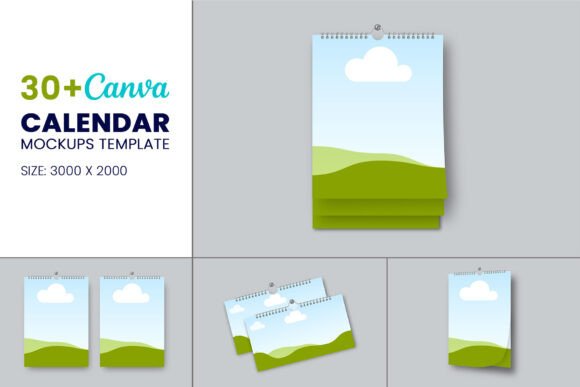
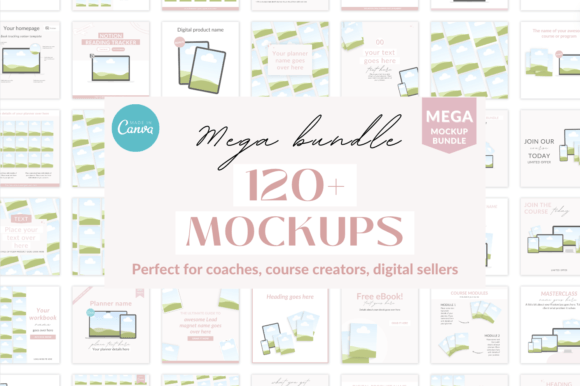
If you're creating digital products, courses, or coaching programs, you know how challenging it can be to present your work professionally. You've spent hours perfecting your content, but when it comes to showing it off to potential buyers, you need something that looks polished and trustworthy. That's where a solid collection of mockups becomes invaluable. The Canva Mockup Template Bundle gives you over 120 digital mockups designed specifically for people like you—course creators, coaches, digital product sellers, and anyone building an online business.
What's Actually Inside This Bundle
Let's break down exactly what you're getting. This isn't just a random assortment of pretty templates. Each mockup serves a specific purpose in your business workflow. You'll find mockups tailored for course creators and coaches who need to showcase their programs in a compelling way. There are mockups for lead magnets and freebies, which is crucial because first impressions matter when someone's deciding whether to hand over their email address. Digital product sellers get dedicated mockups including Instagram post mockups, planner mockups, and workbook mockups—basically everything you need to display your products across different formats and platforms.
Notion template sellers haven't been forgotten either. If you're building and selling Notion templates, you know that presenting them clearly can make or break a sale. The bundle includes mockups specifically designed for this purpose. You also get plain tech mockups that work as versatile foundations for any digital presentation. These clean, simple layouts let your actual content take center stage without visual distractions competing for attention.
Why Mockups Matter More Than You Think
Here's something many creators overlook: the difference between a product that sells and one that doesn't often comes down to presentation, not content quality. When someone lands on your sales page or scrolls past your Instagram post, they're making snap judgments. A professional mockup instantly communicates that you take your work seriously. It builds trust before anyone reads a single word of your product description.
Think about how you shop for digital products yourself. Do you gravitate toward listings with blurry screenshots and haphazard layouts? Probably not. You're drawn to clean, well-organized visuals that help you understand exactly what you're buying. That's the power of good mockups. They bridge the gap between what your product actually is and how potential customers perceive it.
The Canva Mockup Template Bundle understands this psychology. Each template is crafted to highlight your content while maintaining visual consistency across your brand. Whether you're creating a sales page, an email sequence, or social media content, having a cohesive visual language makes your business look established and professional—even if you're just starting out.
Customization Without the Headache
One of the biggest advantages here is that everything works inside Canva. You don't need expensive software, you don't need design skills, and you don't need to spend hours figuring out complicated tools. Open Canva, find the mockup you want, and start editing. Change text, swap colors, adjust fonts—do whatever you need to make these templates truly yours.
This flexibility matters because your brand identity isn't someone else's. The colors you've chosen, the fonts that represent your voice, the overall aesthetic that resonates with your audience—all of that should shine through in every piece of content you create. With these mockups, you're not locked into someone else's design decisions. You're starting with a professional foundation and building something uniquely yours on top of it.
The ability to modify every element also means these templates grow with your business. Launch a new course? Pull out a course creator mockup and customize it for your specific program. Creating a new freebie? Grab a lead magnet mockup and make it match your current branding. The versatility saves you time and ensures consistency across everything you produce.
Practical Applications Across Your Business
Let's get specific about where you'll actually use these mockups. For course creators, think about your sales page. Instead of showing plain screenshots of your course platform, you can present your modules, worksheets, and bonuses in a way that feels tangible and valuable. Coaches can use these templates to showcase their programs, client resources, and workshop materials in a format that builds credibility.
Digital product sellers face a unique challenge: selling something that exists only as a file. Mockups solve this by giving your products visual weight. A planner mockup transforms a PDF into something that feels real and desirable. Workbook mockups show potential buyers exactly what they'll receive, reducing hesitation and increasing conversions.
Social media is another major application area. Those Instagram post mockups aren't just for showing off your products—they're for creating content that stops the scroll. When your feed looks cohesive and professional, you attract followers who become customers. The mockups in this bundle help you maintain that polished look without spending hours on each post.
Important Details to Keep in Mind
A few things worth noting before you dive in. The photos shown in the listing images don't come with the templates. You'll need to source your own images, but that's actually a good thing. Using your own photos or carefully chosen stock images ensures your content feels authentic to your brand. Canva has built-in stock photo options, and free resources like Unsplash offer high-quality alternatives. The download even includes a resource guide pointing you toward the best stock photo sources.
Usage rights are straightforward. You can use these mockups for your own business, your clients' projects, and your marketing materials. What you can't do is resell the templates themselves or share the editable files with others. Add your own content, customize everything to fit your brand, and use the final products freely—but the templates themselves stay yours to use, not redistribute.
Making the Most of Your Investment
With over 120 mockups at your disposal, the real challenge becomes organization. I'd suggest creating a system for categorizing these templates by use case. Keep your course creator mockups in one folder, your social media templates in another, and your product display mockups somewhere easily accessible. When you need to create something quickly, you'll know exactly where to look.
Don't overlook the plain tech mockups either. Sometimes the simplest templates are the most versatile. A clean laptop screen mockup can display anything from a sales page to a dashboard to a design portfolio. These foundational templates often become your most-used assets because they adapt to virtually any situation.
The Canva Mockup Template Bundle ultimately solves a real problem for digital entrepreneurs. You're already juggling content creation, marketing, customer service, and business development. Having professional mockups ready to customize means one less thing on your plate—and a more polished presence across every platform where your audience discovers you.